So, How WILL We Buy CAD Software in 2016…?

Robert Green seems to have answers for everything – if you haven’t subscribed to his CAD Manager Newsletter yet, you should!

Here, in How Will You Buy CAD Software in 2016?, he tackles Autodesk’s move to a Subscription only (rental) distribution model and encourages everyone to prepare for the transition now.

The only quibble I’d have is with this quote:

It’s important to note that this change will affect only those customers who already own perpetual licenses of standalone desktop software; it does not affect customers using Autodesk product suites or those already on a desktop subscription plan or using cloud services.
Anyone who has been through the Land Desktop transition to Civil 3d should understand that statement is probably best read with a big YET inserted at the end…


Thank You for A Great 2014!

That CAD Girl #1 in Sales of Carlson SoftwareCarlson Software recently let me know that – for the 5th year in a row!! – That CAD Girl was #1 in sales of their desktop products!

I owe a huge “Thank You” to my current customers who come back to me for additional purchases and for passing my name along to others because I know I couldn’t do this without you.

The best compliments I receive are your referrals and I look forward to working with you in 2015 and beyond.


March, April & May Webinars – Now Posted!

I’ve just updated my list of Upcoming Webinars for the next few months. There are several new and reconfigured sessions and I’ve got Mark Long, Carlson’s Hydrology expert, on board to show a lot of the design capabilities in Carlson Hydrology in March. Mark’s the best and I think you’ll get a lot out of his training.

A couple other classes are on the list because you asked for them! They’re narrowly focused classes on very specific topics: Carlson AnnotationSurfaces and Breaklines and Working with Paper Space, Sheet Set Manager and Creating Custom Title Blocks. You’ll have ample opportunity to ask questions and start using what you learn right away!

Here’s the link to pre-register and, if you’re not eligible to attend for free, here is the link where you can purchase a year’s access to the webinars.


It’s Trade Show Season – Come See Me!

It’s trade show season again and I am happy to get the chance to go visit old friends and meet new ones over the next few months…

Next one upcoming is the SAMSOG Technical Seminar in Atlanta later this week. I appreciate the opportunity to present my classes to this group for the first time and I understand it’s going to be quite a crowd; but they take walk-ins on the day of the event. I’ll be covering Tips & Tricks in CAD and Carlson and an Introduction to Field to Finish.

Next will be the NJ SurvCon in Atlantic City which starts on 2/4. I think this is my third year and I really enjoy seeing everyone although they all tell me I talk funny! Again, it’s Tips & Tricks but I’ll also be presenting How to Take a Project from Field to Finish with Carlson Survey.

February 11th thru 13th I’ll be in Columbus, Ohio for the 40th Anniversary of PLSO’s Annual Conference. I’ll be in the exhibit hall for most of the time but on Friday will be teaching CAD & Carlson Tips & Tricks. Make sure you visit my booth and see how your CAD skills match up to surveyors in other states!

And, lastly (I think), I’ll be in Murfreesboro TN at the TAPS 47th Annual Meeting & Exhibition from March 12-14. I’ll be in the exhibit hall most of the time but will also be teaching Field to Finish for Survey and GIS Collection from a GIS Dummy on Thursday March 12th.

It’s not a trade show but don’t forget Carlson’s 2015 User Conference at the end of April. I’ll definitely be there since it’s practically in the backyard of my hometown in Kentucky.

Looking forward to seeing everyone!


Carlson Tip: Using Carlson Software? Here’s what to look for in a new computer

Problem: You’re running Carlson Software and need a new computer… What do you need and how much do you need to spend?

The shortest answer is to follow this link to Carlson’s website: Carlson Software System Requirements

The short answer, if you’re running one of Carlson Software’s programs with embedded AutoCAD/OEM or on top of a full AutoCAD, is to follow Autodesk’s system recommendations/requirements for the platform. The Carlson part that runs on top has a relatively light footprint compared to the AutoCAD underneath, so you’ll need to make sure your new computer can run the AutoCAD-engine and the rest will be fine.

Carlson running on top of IntelliCAD also has a pretty light footprint compared to anything developed by Autodesk. Unless your drawings are loaded with a lot of layout tabs and viewports, there’s a very good chance an off-the-shelf computer from Best Buy or Wal-Mart will be sufficient.

Since I’m a self-described hardware “dummy” and that’s not the most technical answer, I asked Leonid Entov, the Assistant Director of Office Software Development at Carlson Software, for a better, layman’s-terms answer:

In one sentence, I would summarize recommended computer as i7 processor, discrete graphics (not integrated), preferably Nvidia chip since we seen more of driver issues with ATI/AMD and 8 gb of RAM (Windows tends to eat too much of 4gb these days). You do not have to go to gaming computers, something like this would be possible to find in $700+ range in laptops.

Since there are too many CPUs on the market, this site helps to compare individual CPUs : http://www.cpubenchmark.net/cpu_list.php

Thanks Leonid!

And I can’t post this without reminding everyone that Carlson’s tech support team is great and will be happy to answer any specific questions you have. Their tech support is free, all the time, whether you’re using a 30-day trial or if you’ve already purchased and whether you’re using the most current version of the software or one that’s 10 years old.

Click here to request a 30-day trial of Carlson Software


2014 That CAD Girl Workshop – Time to Register!


It’s workshop and PDH time again!

We’re mostly following the same calendar as last year with a 1/2 day in Asheville and 2 full days in Statesville and Raleigh. Each event includes drinks, snacks, lunch, door prizes/giveaways and “day-of-show” pricing for Carlson Software including new seats and maintenance renewals.

Register for the Statesville events by Sept 30th or for the Raleigh events by Oct 31st for early registration discounts. Late fees will be applied to registrations within one week of each event.


Carlson Software Workshop in Asheville NC, Monday Nov 17th
View Announcement  –  Register Now!

Statesville Workshop for Surveyors and Contractors, Tuesday Nov 18th
View Announcement   –  Register Now!

Statesville Workshop for Engineers and Designers, Wednesday Nov 19th
View Announcement  –  Register Now!

Raleigh Workshop for Surveyors and Contractors, Tuesday Dec 9th
View Announcement  –  Register Now!

Raleigh Workshop for Engineers and Designers, Wednesday Dec 10th
View Announcement  –  Register Now!


Carlson TerraVision 2014

Carlson Takeoff 2015


Carlson Tip of the Day… Virtually “printing” to PDF, DWF, JPG and PNG files

Penwill CartoonsIf you’ve recently switched from an AutoCAD-based program to Carlson with IntelliCAD, one thing you may miss is having the ability to virtually “plot” your drawings to PDF, DWF, JPG and PNG files instead of to paper. This functionality is not included in IntelliCAD and, from what I understand, including it would have significantly increased the price of each license so the developers decided to leave it out and allow users to purchase add-on programs if needed the functionality.

So, if you need to print to one of these formats, how can you do it?

If you primarily need to create PDF files and don’t mind spending some kinda-big bucks, you can purchase a program such as Adobe AcrobatAcrobat is a standalone program but it also installs as a virtual printer into Windows-based programs like Carlson, AutoCAD and even Microsoft Windows and Outlook.

If you need to print to PDF, you could save some money and consider other after-market programs such as CutePDF or PDF995 (or many others) that essentially serve the same purpose – installing as a PDF printer into Windows-based programs. Most of these programs have a free version but there’s usually a catch such as a watermark on each PDF that says something like, “This document printed with …”. If you purchase one of their other products, the watermark goes away. I currently use Adobe Acrobat but used Win2PDF for years.

If you need to print to PDF but also to other formats such as PNG, JPG and TIF, you may want to take a look at PDF Creator from SourceForge. I know this is the utility recommended by several of the tech support team at Carlson but I haven’t used it myself.

I am not sure if the other programs that I listed above (PDF995, CutePDF and Win2PDF) allow you to “print” to formats other than PDF and I can’t tell from their websites but, if anyone knows and wouldn’t mind passing that information along to me, I’ll update this post with the additional information.

As mentioned above, having these PDF-creating programs installed like a printer directly in your Carlson programs makes them very convenient and handy – but there is most likely a cost associated with them all.

My final recommendation is free, but a little less convenient – it’s Autodesk’s DWG TrueView (this link changes all the time – apologies in advance). It’s free, but it allows you to use all the virtual printers included in AutoCAD such as DWGtoPDF, DWGtoJPG, DWGtoPNG and DWF ePlot. In addition, TrueView also includes the oh-so-cool DWG TrueConvert program that enables you to convert one or more DWG files from any version to pretty much any other version. The downside to using this program is that it’s a standalone program so you must save your drawing and then open again in TrueView in order to plot.

Happy Plotting!


Carlson Survey 2015 with Embedded AutoCAD has been released

Carlson Survey 2015


MAYSVILLE, Ky., U.S.A. (August 13, 2014)—  Carlson Survey 2015 OEM is an easy-to-use, intuitive software. Its newest update provides upgrades to the 3D viewer that allows users to apply textures, animation, surface updates, even record movies and import Sketch-Up objects. The software’s popular field-to-finish feature has also been enhanced for 2015 to allow surveyors to do coding on pipe networks that then allows them to build a network of pipes.

Together with Carlson Survey 2015 version, which works on AutoCAD® versions 2007 to 2015 and comes with the improved IntelliCAD® 8.0 built-in, Carlson Survey OEM is the number one office software solution for surveyors in the United States.

Read the rest of the press release

Request a 30-day trial

Request a live demonstration

Request a custom proposal

See these products in our Online Store


Carlson 2015 Has Been Released!

Carlson posted the 2015 versions of their for CAD (IntelliCAD or AutoCAD 2004-2015) on Tuesday afternoon… you can Download Carlson 2015 products with IntelliCAD here. The 2015 versions of embedded AutoCAD products (Survey and Takeoff OEM) will be released later this summer.

If your maintenance contract is current or you have purchased 2014 products within the past 90 days, you’re automatically eligible for an upgrade to 2015. Click here to look up your 2015 serial number using your 2014 serial number.

Click here to review the list of all improvements

Click here to read about updates in Carlson Survey 2015

Click here to read about updates in Carlson Civil and Carlson Hydrology 2015

Click here to read about updates in Carlson Takeoff Suite 2015 – including Construction, CADNet, Trench and GeoTech

There are price increases with 2015 products. Click one of these links if you would like to Request a Demonstration or Request a Custom Proposal to upgrade to 2015 or purchase new software.

Please follow this link to see if you’re eligible for our monthly webinars including CAD and Carlson Tips & Tricks, Intro to Survey and GIS and What’s New in Carlson 2015.


Autodesk Policy Change – No Upgrades After Feb 1, 2015

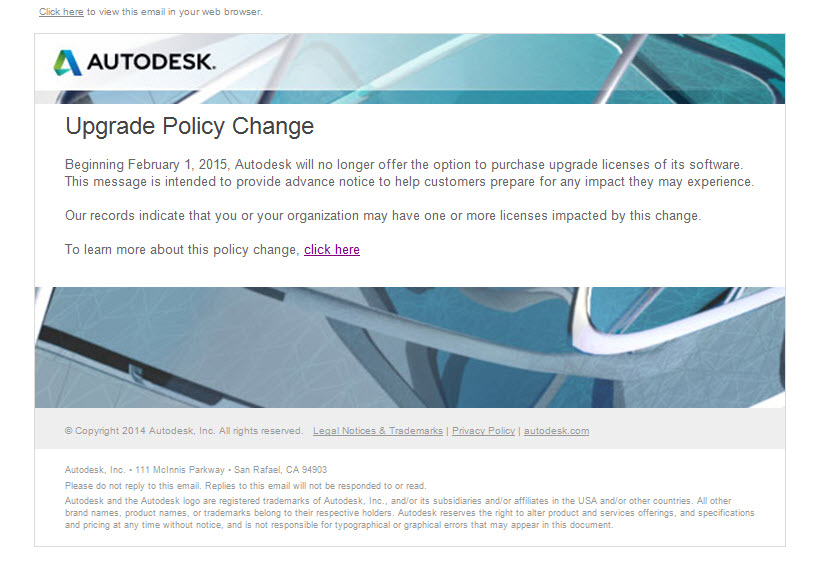
As a current Autodesk subscription customer, I received this message in my Inbox yesterday:

Autodesk Upgrade Policy Change


The link to find out more takes you here: Frequently Asked Questions about the Autodesk Upgrade Policy

I think we all saw this coming but now that it’s upon us, it’s time to make sure our software licensing ducks are in a row.

1 of 1